

Variables
Projects variables
One of the key aspects of fDeploy is variable management.
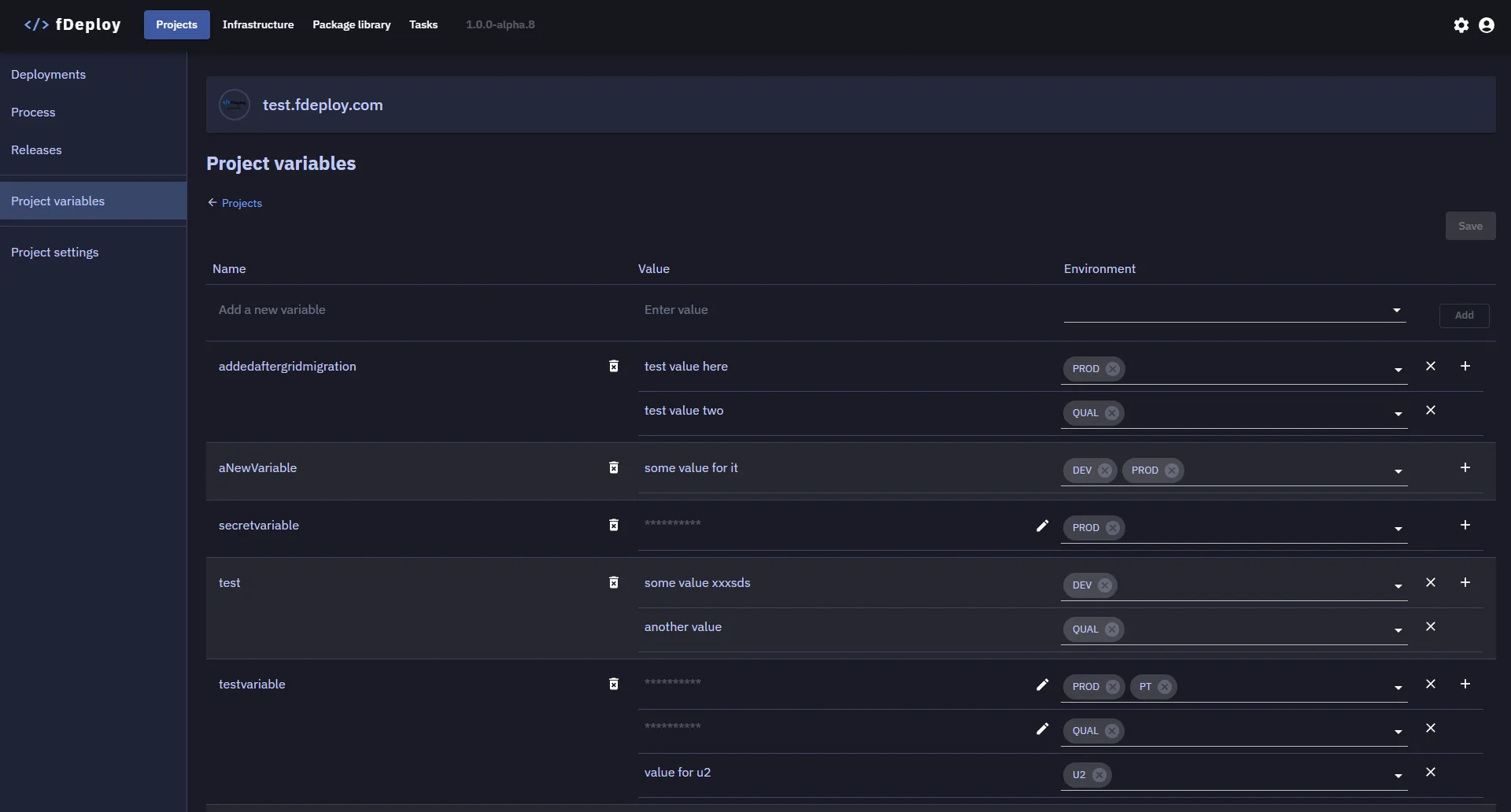
It is not uncommon for projects to have hundreds of variables which vary based on environment or target role. fDeploy allows you to create variables, define one or more values and scope it to one or more environments.
When a release is created, fDeploy captures a snapshot of all project variables alongside the deployment process — see variable snapshots for how snapshots are created and updated.
Linked library variable sets
A project can also link one or more library variable sets — shared variable collections defined centrally in the library and reused across projects. Linked sets contribute their variables to the project’s effective variable list (visible in the Insert Variable picker and captured in release snapshots).
When the same name appears in both, project variables always win over linked-set values. Use library sets for organization-wide values that should stay in lockstep across projects, and project variables for anything project-specific (or for one-off overrides of a shared name).
Variable substitution syntax
fDeploy uses two related placeholder syntaxes depending on where the placeholder appears.
In target files — #{variable_name}
During deployment, fDeploy Agent scans the target files configured in the Variable substitution section of a deployment step and replaces each #{variable_name} placeholder with the corresponding variable value.
Variable names can contain letters, underscores, and numbers. For example:
#{ConnectionString}#{DB_PASSWORD}#{api_key_1}
In step fields and script bodies — #{Variable.variable_name}
Most text fields across deployment steps — including the IIS website name, application pool, bindings, web application and virtual directory paths, authentication checkboxes, package options, PowerShell script bodies, and email subject/body — accept inline placeholders using the #{Variable.variable_name} form. The Variable. prefix distinguishes project variables from system-provided placeholders such as #{Project.Name}, #{Release.Version}, and #{Environment.Name}.
For example, in an IIS step you can set the website name to #{Variable.SiteHost} and have it resolve differently per environment. See Variable binding in step fields for the full list of fields that support binding, and the Insert Variable button that splices tokens at the cursor position.
Step-field placeholders are resolved server-side before the deployment step is dispatched to the fDeploy Agent. Target-file placeholders are resolved agent-side during file substitution on the target machine.
Variable scope resolution
fDeploy resolves variables by first looking for values scoped to the target environment. If no environment-scoped value is found, it falls back to values with no environment scope (available in all environments). Sensitive variable values are decrypted at resolution time (on the server for step-field placeholders, on the agent for target-file placeholders).
Sensitive variable values
By marking a value as sensitive, fDeploy will encrypt the value before storing it.

After saving changes, the sensitive value can not be displayed or retrieved again via the fDeploy API.
Sensitive values in step fields
Sensitive values take two different paths through fDeploy depending on whether the consuming step is an IIS/infrastructure step or a PowerShell script step.
In IIS, transform, and variable-substitution step fields — the server decrypts the value just before dispatching the step to the agent and substitutes it directly into the target field (website name, app pool, binding host, etc.). The decrypted plaintext is registered with the deployment log redactor so any occurrence in a task log entry (agent output, server-composed descriptor, exception text) is replaced with *** before the log is persisted. Agent infrastructure services are hardened so they never echo user-supplied field values in response messages, eliminating most leak paths by construction.
In PowerShell script bodies — sensitive values are not substituted into the script text. Instead, the server rewrites each #{Variable.X} (where X is sensitive) to $env:FDEPLOY_SENSITIVE_X in the dispatched script and ships the plaintext separately over TLS. The agent launches powershell.exe with the plaintext injected as child-process environment variables (scoped to the script’s process only — never touching the agent host environment), and PowerShell resolves the reference at runtime. This ensures sensitive plaintext never appears in the script source as written, defeating PowerShell tracing, syntax-error echoes, and transcription leaks. See Execute a script for the full details and the known script-authored leak patterns.
Redaction via substring matching is applied as a safety net on top of both paths. Two caveats follow from this:
- Over-redaction is possible when a sensitive value happens to equal a common word that also appears as plain text in log templates. The log will show
***wherever the word occurs, even when the occurrence is incidental. Using high-entropy values (URLs with dots/dashes, tokens, random strings) avoids this. - Script-authored derivatives are not guaranteed to be masked. A script that computes something from a sensitive value (substring, hash of first N chars, length, encoded form) can produce output that bypasses substring matching. This is the same class of vulnerability tracked as CVE-2020-25825 and requires user discipline in script authoring. The Execute a script documentation lists the known patterns to avoid.